iPhone and iPad, iOS 17 and later
Cut list optimizer for iPhone and iPad
Type your parts and the sheets you can buy. Sawgrid works out a cutting plan a workshop can actually produce: guillotine cuts end to end, real kerf, grain direction on every part, and an area balance that closes. Calculating is free and never metered.

Free to download. Pro is a one time purchase or a subscription, your choice.
- Cabinetmakers
- Joiners and shopfitters
- Metal fabricators
- Table saw and track saw workshops
- Serious hobbyists
- 89.6 % parts
- 4.1 % reusable offcut
- 0.7 % kerf
- 1.7 % edge trim
- 3.9 % waste
Four screens, start to saw
These are the actual screens, not a mock up. Swipe sideways on a phone.
-
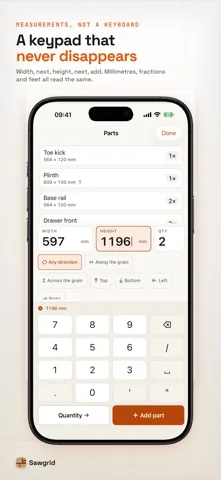
1. Type the partsA keypad built for measurements, not a text keyboard. Millimetres, fractions and feet all read the same.
-
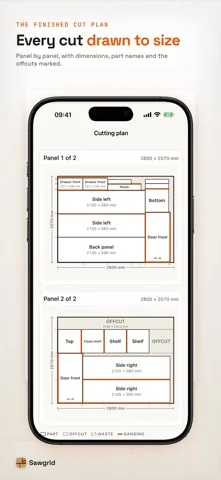
2. Read the planEvery cut drawn to size, with part names, dimensions and the offcuts marked.
-
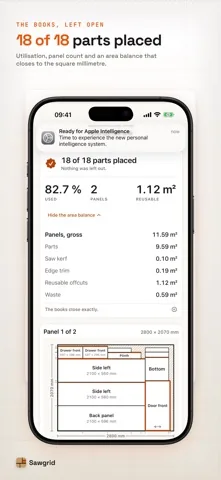
3. Check the booksParts placed, utilisation, and the area balance opened up: gross, parts, saw kerf, edge trim, reusable offcuts, waste.
-
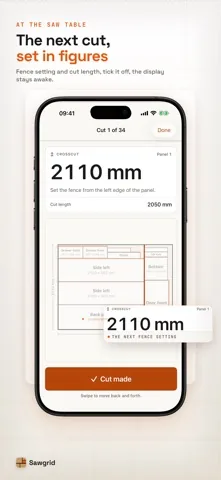
4. Work through itSaw table mode: the next fence setting in figures you can read from two metres away, and the screen stays awake.
Built against the complaints, not the feature list
Every point below is a specific, repeated failure in this category. Some of them cost people real money in wasted material.
-
Every part is placed or reported
If a part cannot fit, Sawgrid blocks and names it, with its size and the stock item it was measured against. It will not hand you a plan that is quietly missing a piece.
-
The kerf is real
The blade eats material out of the free area beside a part. It is never added to the part size, and no kerf is charged at an outside edge of a panel, because there is no cut there. How the kerf arithmetic works.
-
Grain direction per part
Three valued on every single part: free to rotate, forced lengthwise, forced crosswise. Inherited from the material, overridable anywhere. The stock panel carries its own grain axis.
-
Your offcuts are stock
Leftovers carry a size, a quantity and a priority. Give them a lower priority number than fresh sheets and the optimizer will use up the rack before it cuts into a new panel. More on the offcut rack.
-
One field, any unit
No unit switch to forget. The same box understands 720, 18mm, 1,8 cm, 3/4", 0.75in, 24 1/2 and 2' 6 3/4.
-
A PDF that actually prints
One page per sheet, drawn to scale and dimensioned, plus the cut list in cutting order, a label sheet and the CSV. Straight through the normal share sheet, so it prints, AirDrops and saves to Files.
Try it on your next job
Calculating is free and nothing about it is metered. Type the parts you were going to type anyway and see whether the sheet count matches what you were about to buy.
iPhone and iPad, iOS 17 and later.
Three steps, then you cut
No wizard, no free run to burn by mistyping a number, no paywall between you and the result you already typed in.
-
Type the parts
Name, width, length, quantity, grain. Paste a room full of panels in one go, or add them one at a time. Every field takes any unit you feel like typing.
-
Describe your stock
Full sheets, half sheets and the offcut rack, each with a quantity and a priority. Set the kerf of your blade and the trim your supplier leaves on the edge.
-
Solve and print
Plans per material, a cut list in the order you will actually cut, a shopping list, and a balance that closes. Then a PDF for the wall next to the saw.
What is under the lid
Not because you have to care, but because the plans are only as trustworthy as the arithmetic behind them.
-
108
Candidate plans per run
Six split rules times three placement rules times six sort orders. No single heuristic wins consistently, the winner changes with every job, so Sawgrid runs them all and keeps the best one.
-
0.1 mm
Integer arithmetic, no floats
Every length in the app is a whole number of tenths of a millimetre. One inch is exactly 254 of them. Same discipline that stores money as integer cents, for the same reason: drift is not acceptable.
-
1 : 1
Deterministic by construction
Solve the same project twice and you get identical plans. The optional refinement pass is seeded from a fixed constant, never from the clock, so a plan you printed yesterday is the plan you get today.
-
< 0.3 s
Fast enough to keep tweaking
A few hundred parts solve while your thumb is still on the button. Change one dimension, resolve, compare. That is the loop the category has been missing.
What is free, and what Pro costs
Competing apps in this category meter the calculating. Sawgrid does not, and it says plainly where the line is instead of letting you find out at the paywall.
-
Free, with no counter running
Calculating is free and stays free: as many parts and panels as a job has, as many recalculations as you like, all 108 strategies on every run, and the full cutting plan on screen with dimensions, part names and the area balance. Nothing is metered, and no attempt is burned by a typo.
The free tier works on one project at a time, with one material, at a fixed 3.0 mm saw kerf. It carries a banner under the project list, the editor and the plan, and one full screen advertisement after an optimisation.
-
Pro is the workflow around the plan
The multi page PDF, the label sheet and the CSV cut list. Your own blade kerf instead of the fixed one. A grain rule per part. Several materials in one project. More than one project at a time. Saw table mode. The offcut inventory that carries across projects. The slower, more thorough optimisation pass. No advertising.
Pro is a subscription or a one time purchase. The lifetime price matches one year, so you can pay for a year or pay once and be done.
Start with the free plan
The whole cutting plan is in the free tier: the map, the utilisation and the area balance. Nothing is held back until you pay.
Free to download. Pro is optional.
Guides
The arithmetic behind a cutting plan, written out, with the numbers Sawgrid actually uses.
Questions
If yours is not here, write to us. A person reads that inbox.
Does Sawgrid need an internet connection?
No. The optimizer, the drawings, the PDF export and the offcut inventory all run on the device. The only part of the app that reaches the network is the advertising in the free version, and Pro carries none. You can plan a job in a basement workshop with no signal.
Do I have to create an account?
No. There is no account, no login and no server. Your projects live in the app's own storage on your device.
Is the cut list optimizer free?
Yes. Calculating is free and nothing about it is metered: as many parts and panels as the job has, as many recalculations as you like, all 108 strategies on every run, and the full cutting plan with dimensions, part names and the area balance.
The free tier works on one project at a time, with one material in it, at a fixed 3.0 mm saw kerf that the result screen states every time.
Is there advertising in Sawgrid?
In the free version, yes. It shows a banner under the project list, the editor and the plan, and one full screen advertisement after an optimisation. Pro removes both and carries no advertising at all.
How does Sawgrid handle saw kerf?
The kerf is taken out of the free area beside a placed part. It is never added to the size of the part, and no kerf is charged at an outside edge of the panel, because there is no cut there. Pro users set the blade width their saw actually cuts; free plans run at a fixed 3.0 mm and say so on the result screen. The arithmetic is written out in the kerf guide.
Can one project mix several materials?
Yes, with Pro. A real carcass job mixes 19 mm plywood, a 6 mm back panel and solid timber. Sawgrid solves each material against its own stock, prints a separate plan per material and gives you one consolidated shopping list. The free tier runs one material at a time.
How does Sawgrid handle grain direction?
Grain is a three valued setting on every single part: free to rotate, forced lengthwise, forced crosswise. Each part inherits the setting from its material, and you can override it on any part without touching the others. The stock panel carries its own grain axis, so a cross grain sheet is handled correctly too. Grain per part is a Pro switch; free plans treat every part as free to turn and say so on the result.
Can Sawgrid use the offcuts I already have?
Yes. An offcut is simply stock with a size, a finite quantity and a priority number. Give the rack a lower priority than fresh sheets and the optimizer consumes your leftovers before it opens a new panel. Usable offcuts produced by a run can go straight back into the rack with their real dimensions.
Which units can I type?
One field, no unit switch. It understands 720, 18mm, 1,8 cm, 3/4", 0.75in, 24 1/2 and 2' 6 3/4. Metric and imperial can sit side by side in the same project. Anything the parser cannot read with certainty is rejected outright rather than guessed at.
What happens if a part does not fit?
Sawgrid stops and tells you which part it is, how big it is, and which stock item it was measured against. This is the single most damaging failure in this category: a plan that silently drops a piece sends you to the merchant with the wrong quantity, and you find out at the saw.
Does Sawgrid nest irregular shapes?
No, and that is a deliberate limit. Sawgrid plans rectangular guillotine cuts, which is exactly what a table saw, a track saw or a panel saw can physically execute. True nesting of arbitrary polygons needs minutes of compute on a desktop machine, which is not an honest thing to put in a mobile app.
Can it optimize linear stock as well as panels?
Yes. Trim, battens, tubes and profiles are optimized one dimensionally, in the same project as your panels, with the same kerf and the same balance guarantee. There is a separate page on the linear solver.
Will the same project always produce the same plan?
Yes. Every heuristic in the portfolio is deterministic, and the optional refinement pass draws from a fixed seed rather than from the clock. If you printed a plan yesterday and solve again today, you get the identical plan.
Which devices does it run on?
iPhone and iPad, iOS 17 and later. The typing is built for one hand at a bench, and the cutting plan takes the room a larger screen gives it.
Measure twice. Let Sawgrid do the rest of the arithmetic.
Sawgrid is a planning tool. It is very good at the packing and the bookkeeping, and it still cannot see your saw. Check every dimension against the drawing before the blade goes in.
iPhone and iPad, iOS 17 and later. Free to download.